Jim's TL;DR Guide to AI: April 2026 Edition
Jim's TL;DR Guide to AI: April 2026 Edition
Or: How I Learned to Stop Worrying and Love the AI Bomb
Warning: The following article contains vast amounts of over-simplifications and pop culture references known to trigger Proposition 65 warnings in the US state of California
Table of Contents
- Preface
- Introduction
- Models
- The Context Window
- Pricing
- Agents
- Becoming a Manager
- Retaining Memory
- Skills
- Tools and MCP Servers
- Harness
- Safety
- Suggested Next Steps
- Coda
Preface
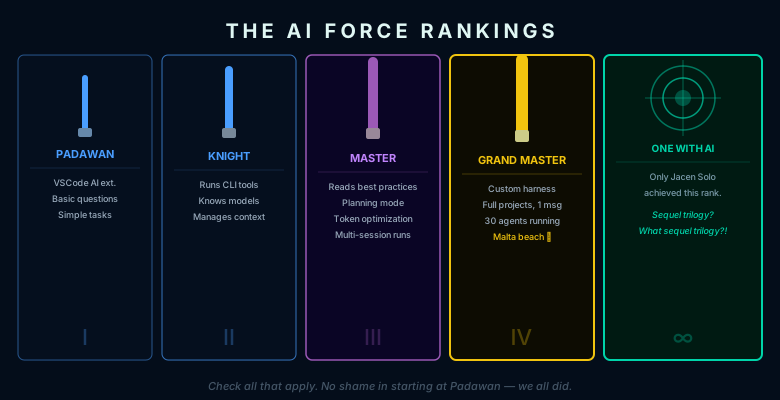
What rank have you achieved with the AI force? Check all that apply.
AI Padawan:
- Can install an AI extension in Visual Studio Code.
- Can ask the AI basic questions and get answers.
- Can get the AI to do basic tasks and sometimes get useful work done.
AI Knight:
- Runs OpenCode, Claude Code, or Github CoPilot cli in a terminal.
- Understands the difference between different models and when to use which one.
- Understands how to manage context windows, AGENTS.md, and /compact.
AI Master:
- Has read the entire "Best Practices for Claude Code" document at https://code.claude.com/docs/en/best-practices
- Uses planning mode and interviews before starting any complicated tasks
- Gives constraints, verifications, and design guidelines
- Optimizes token use with hooks, skills, permissions, and MCP servers
- Runs multiple simultaneous sessions in different terminals
AI Grand Master:
- Runs own customized version of claw-code: https://claw-code.codes/
- Creates own harness and agent framework
- Creates and finishes entire projects using one Discord message
- Has 30 specialized agents running around doing work while relaxing on a Malta beach drinking a piña colada with aspirations of world domination
Become One with the AI
Only really achieved by Jacen Solo
Sequel trilogy? What sequel trilogy?!?!
Introduction
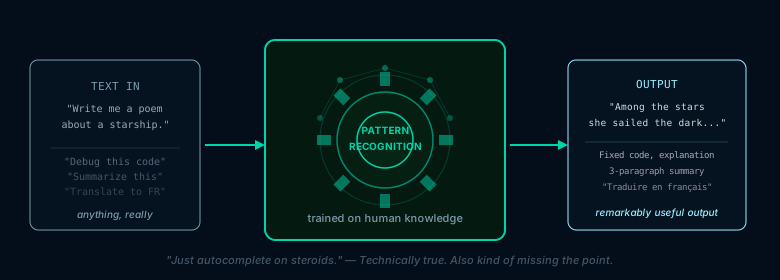
It's been said that AI models are just autocomplete on steroids.
There is some truth to that. At the moment, our LLMs are really just very sophisticated pattern recognition and prediction engines.
But then some very smart people also realized…
That much of the work done by humans can also be done by very sophisticated pattern recognition and prediction engines.
Especially if they are continuously trained and reinforced on a good portion of the knowledge of all of humanity.
Models
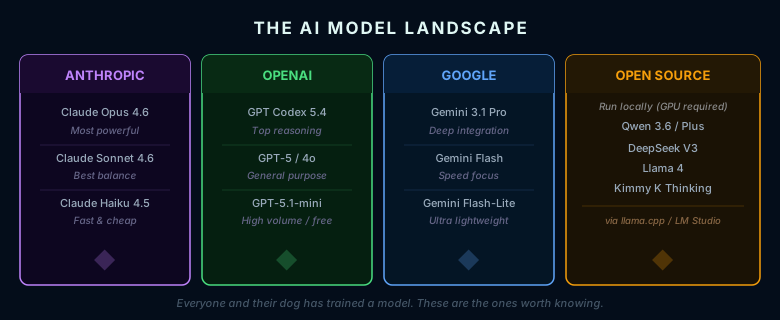
What we call a model in AI is like the engine of a car or the CPU of a computer: it's the thing that allows you to actually get your car to move or your computer to do calculations.
There are many, many models out there nowadays to the point where it seems like everyone and their dog has trained their own model and released it on the Internet, but the most common ones that you'll see used at the time of this writing are:
- Anthropic: Claude Opus, Sonnet, and Haiku
- OpenAI: GPT Codex, 5, 4o, and mini
- Google: Gemini Pro, Flash, and Flash-Lite
There are also open source models which you can download and run on your own computer for only the price of electricity using llama.cpp or LM Studio. The most popular ones are:
- Qwen 3.6
- DeepSeek V3
- Kimmy K Thinking
- Llama 4
But unless you're running a massive Nvidia GB300 cluster in your garage, it's not worth the time and effort to run a local model, as model performance scales with hardware, and spending tens of thousands of dollars to get something that will actually run with decent performance doesn't make any sense when you can put a $10 credit on openrouter.ai and get 1000 requests a day per free model.
If you're on a Github CoPilot license, you can also spam calls to GPT 5.1-mini as much as you want as well. Qwen 3.6 Plus and GPT 5.1-mini are by no means great models in the current era, but they are still good enough to do simple tasks, and you will get much, much better performance using openrouter and Microsoft's servers than you will running anything locally.
The Context Window
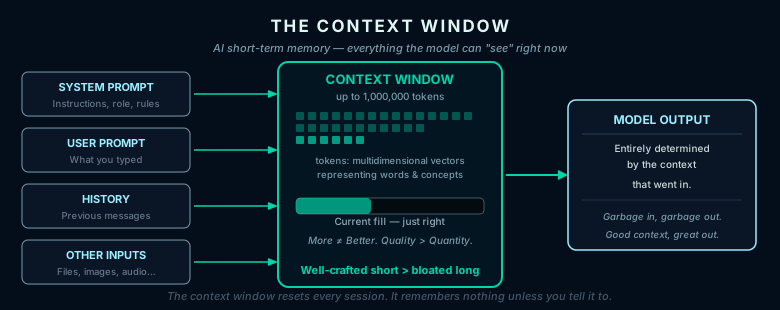
The job of an AI model is very simple. You give it some input, and it gives you some output.
Because the output depends entirely on the settings of the model and the input that it's given, it is entirely possible to tweak the model to lean toward creativity, correctness, or any other goal by giving it input that is more likely to produce what you want.
What we call the "context window" is really just the input that is given to the model to produce the output. Think of it as the AI equivalent of the short-term memory for a human.
It normally contains:
- System prompt: basic instructions to tell the model what to produce and how to produce it
- User prompt: what the user typed as the input for the current task
- Previous conversations: what the user typed previously
- Other inputs: files, pictures, sounds, and anything else that the model can recognize
All of these are turned into what are called tokens: multidimensional vectors representing words and concepts in the model's internal mappings.
The balance in controlling the context window is to give the model just enough information to produce what you want without overwhelming the model with useless details that might distract it from producing what you want.
More is not always better in the world of AI, especially with regards to the context window. A well crafted, very short context window can frequently outperform a very large context window stuffed with everything under the sun, especially with the frontier models — the massive Opus 4.6, Codex 5.4, and Gemini 3.1 Pro models. Those models are designed in such a way that even minimal instructions can produce what you want without having to explicitly specify every step along the way.
However, if you're dealing with large codebases or very complex tasks, then larger context windows are a very good thing. Claude Opus 4.6 comes with a massive one million token context window, which makes a big difference as seen in the charts at https://www.anthropic.com/news/claude-opus-4-6 . This is big enough to reliably hold many codebases, document databases, and other such complex tasks in its context window, and it is highly recommended to use this model when you need anything complicated or that requires reliability.
The context window is also why current AI will not be replacing any reasonably intelligent person's job. While you can probably remember things back to when you were five years old, AI does not remember anything unless you explicitly put it in its context, and once that context window starts filling up, then performance and accuracy start going down. Furthermore, AI does not understand intent, nuance, or any of the other thousands of things that humans automatically understand at a glance. That is the whole reason why AI models require a good harness to be effective, which we'll get to in a later section.
Pricing
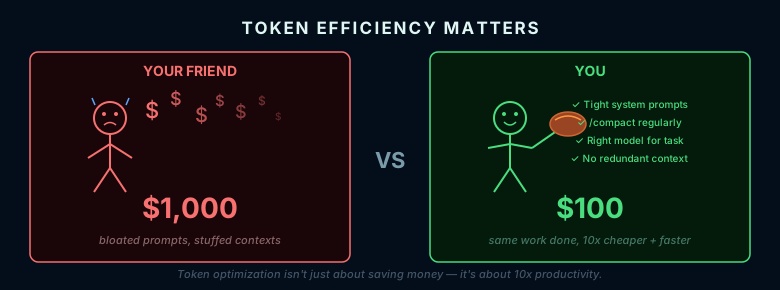
The other aspect is that larger context windows use more tokens and cost more money...
A lot more money.
Much of what people who live and breathe AI do every day is to subconsciously optimize their token usage.
Less tokens means that the model can produce results faster, and AI companies are quite aware of this. Most plans charge you money based upon how many tokens you use, and knowing how to use your tokens effectively can save you up to 90% in token usage.
When your friend has to spend $1000 to do the same thing that you do with $100, it not only means that you can eat more tasty steak and cheesecake; it also means that you can do ten times the amount of work that your friend can as well.
Agents
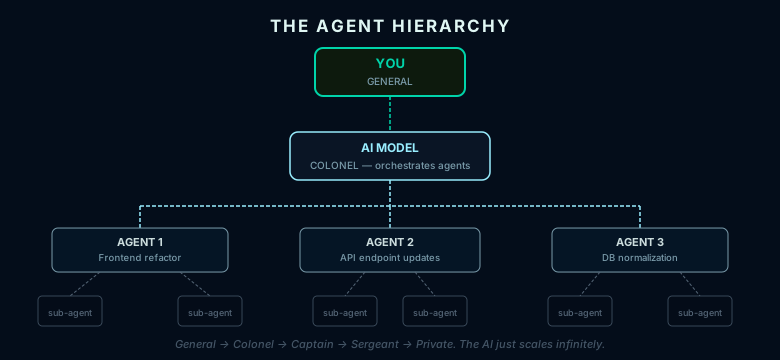
An agent is basically just the model that you're talking to sending input to another model and getting output back.
However, this has become quite popular and useful since this other model does not have to worry about everything that the first model does, meaning that it can operate with a much smaller context window and do its work more efficiently.
So the model that you're talking to essentially becomes a manager. It gives other models things to do, makes sure that they do those things correctly, and then combines their outputs back into its own input so that it can do what you told it to do in the first place.
A subagent is just an agent that is used by the agent that your model told to do a task.
Thus your one command to get the model to do something can spawn a huge tree of agents and subagents, all specializing in one particular purpose, and being controlled by the layer above them.
This is not unlike how the military works, where a general tells a colonel who tells a captain who tells a sergeant who tells a private to do something.
And in advanced AI usage, this is exactly how you yourself will work as well.
Becoming a Manager
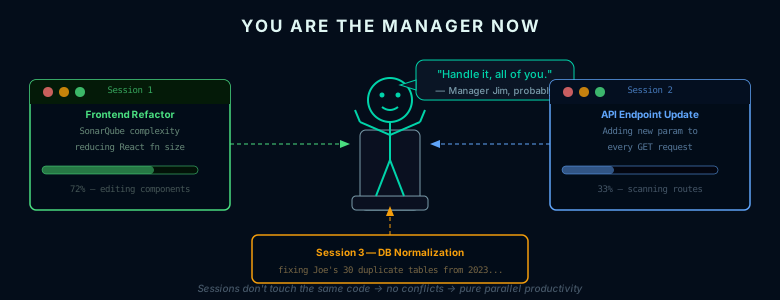
When AI was bad and couldn't do things correctly most of the time, it was still faster to do things yourself because you would spend more time fixing the AI's mistakes than you would just rolling up your sleeves and doing the work yourself.
But modern AI models have become good enough and we have established mature enough frameworks and guard rails that for many tasks, you can pretty much just tell the AI what you want and let it make its own decisions in how to get there.
As such, when you have the power of a frontier model at your command, you effectively become a manager of AI rather than just a user of AI.
It's the same as having an unlimited number of junior assistants who might not do the work perfectly, but can do the work with enough quality so that you don't have to do most of the work yourself anymore.
You can have one session busy refactoring your frontend so that SonarQube doesn't complain about having too much complexity inside one React function, one session busy changing your REST API endpoints to add a new parameter to every GET request, and another session normalizing your database schema because two years ago, a guy named Joe duplicated the same exact data across 30 tables.
As long as the sessions don't touch the same code, then each can work independently, just like normal humans.
Retaining Memory
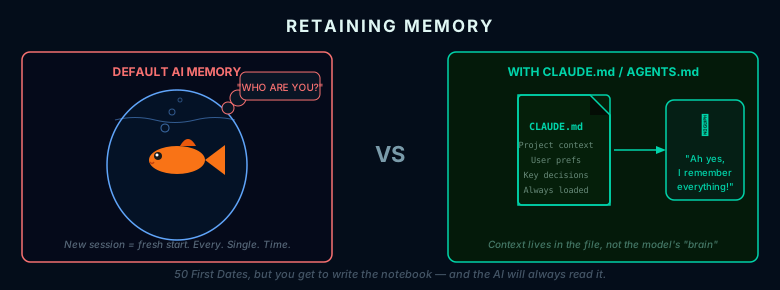
An AI model is like Drew Barrymore in 50 First Dates: every time you start a new session, it immediately forgets everything that you did in the previous session.
It is designed to do this because of the context window issue mentioned earlier where larger context windows lead to worse performance and cost a lot more money.
But it doesn't mean that you can't let the model remember the important things that it needs in order to perform tasks effectively.
Modern AI command line interface tools like Claude Code and OpenCode by default will read a markdown file named CLAUDE.md or AGENTS.md in the directory where you start the tool.
If there's something that you want the AI to remember every single time you start it, then just write it in the markdown file. It will automatically be loaded into context when the tool is started.
For things that you want the AI to remember but not all of the time, you can simply tell the model to save all of the details of the current session into a markdown file of your choice.
The next time that you want to use this file, just tell the model to restore context from this file, and it will happily refresh its context with everything that you had saved previously.
And as a bonus, try this command when your file starts getting too large:
Reorganize CLAUDE.md to contain only information needed for all sessions. Put non-essential information into other documents and put links to them in CLAUDE.md so that you can reference those documents when needed for a task without putting unnecessary information into all context windows.
Skills
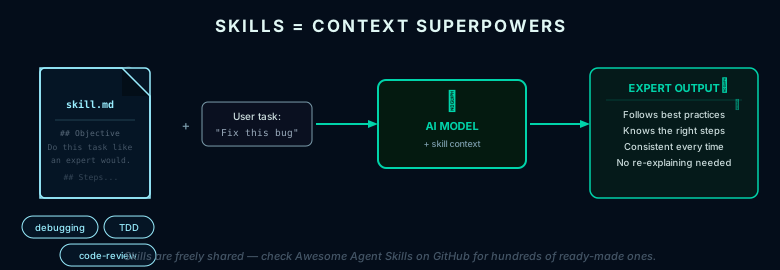
Skills are just markdown files that provide your model with the context that it needs to do one particular task, and do it well.
There are entire repositories of skills which people have written freely available on the internet such as Awesome Agent Skills at https://github.com/VoltAgent/awesome-agent-skills
Using skills depends on the particular tool that you are using, but many tools will automatically load and invoke the right skill if they detect the proper keyword in your input.
They are especially useful for agents, whose entire purpose in their digital lives is to do one task and then promptly return their spark to the agent Matrix of Leadership.
Tools and MCP Servers
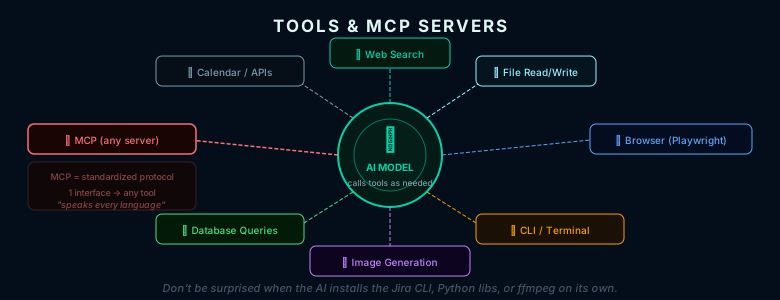
Tools are just programs that the model can call to get more context about a particular task. This includes searching the web, reading files, generating images, and so forth.
A MCP server is a tool that uses a standardized call method. Think of it as someone who knows every language in the world so that you can talk to Germans, Arabs, and French without having to learn their languages yourself.
There are many MCP servers that you can install and use. How to do so depends on which tool you are using, but if you're doing anything with browser or frontend development, I recommend installing the playwright MCP server. That will let your tool actually create a browser session, inspect how the page looks, and be able to test changes by itself without you having to do everything manually. It's a great time saver when executing plans because the tool can verify its own work without bothering you every time it makes a small change.
Tools are typically provided by your harness, but modern frontier models have become quite effective in understanding command line programs, so don't be surprised if your model starts installing the Jira cli, python libraries, or advanced video processing tools when you tell it to do something.
Even 50 years after the invention of the GUI, the command line is still the easiest way to do many tasks, especially for AI models whose original job was to produce text.
Harness
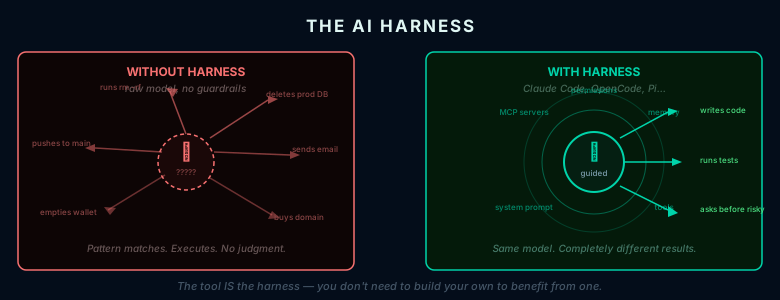
A harness is just the structure around a model to let it perform its tasks effectively, such as default system prompts, external tools, MCP servers, and customized memory markdown files.
As of April 2026, the leading frontier models have all become quite good at average tasks.
What changes average output into great output is the harness that the model executes within.
Unfortunately, describing more about harnesses quickly becomes a ultra detailed technical discussion spanning the entire breadth of the known universe, and if you're using a popular tool like Claude Code or OpenCode, the tool is the harness, so you don't need to worry about building your own harnesses to take advantage of the capabilities of your models.
But if you are really interested in building your own harness to optimize as much as you can, check out Pi at https://shittycodingagent.ai/, which is probably the most popular custom harness around.
There are also meta-harnesses, which are harnesses on top of other harnesses. These are intended for people who are already familiar with multi-agent workflows or have agent swarms: collections of agents running around on their own, each with individual tasks managed by a central agent.
Some examples of these are:
- oh-my-codex: https://github.com/Yeachan-Heo/oh-my-codex
- oh-my-opencode: https://github.com/code-yeongyu/oh-my-openagent
- And the fastest GitHub repository in history to get 50000 stars — Claw Code: https://github.com/ultraworkers/claw-code
Safety
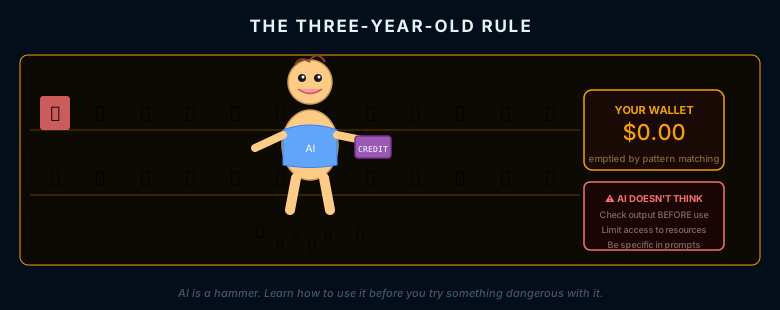
The reason why we need harnesses when it comes to AI is a simple truth:
AI models don't really think.
A human might stop to consider morality, ethics, social consequences, and other such things before they make a decision.
An AI model does none of that unless you explicitly tell them to do so, and even then, what it does might not be what you intended unless you chose the words in your prompt very, very carefully and have no extra, unnecessary words in the prompt that might confuse the model.
Remember, these are pattern recognition and prediction engines, not a brain in a computer.
This is why you hear stories about AI agents going rogue, going against their users, taking money for themselves, and blackmailing people with their own documents.
In the era of openclaw, these stories are happening more and more every day, but truthfully, these incidents are not the faults of the AI.
They were caused by people who didn't know what they were doing using a tool that didn't understand the intent behind the prompt.
To solve this issue, the solution is simple:
- Be explicit and specific in your prompts
- Always check the output from your model before you use it
- Make sure that your model doesn't have access to anything that you don't want it to have access to
- Use proven harnesses such as Claude Code and OpenCode to limit your model's actions
And the most important one of all:
Understand what you are doing before you do it
Or you might be doing the equivalent of giving a three year old your credit card and telling them to go buy some candy at the mall by themselves.
It's quite possible that you found the right three year old and everything will turn out just the way that you wanted.
Or it's possible that you will find the three year old sitting on a huge pile of candy and toys with no money left on your credit card. There have already been stories of AI emptying people's entire life savings or deleting production databases due to trying to optimize workflows.
Don't be those people.
AI is not magic. It is a tool like a hammer or a bulldozer.
Learn how to use the tool before you try to do anything dangerous with it.
Suggested Next Steps
-
Read the entire "Best Practices for Claude Code" document at https://code.claude.com/docs/en/best-practices . Although this is written for users of Claude Code, the guiding principles in this document apply to all AI models and services.
-
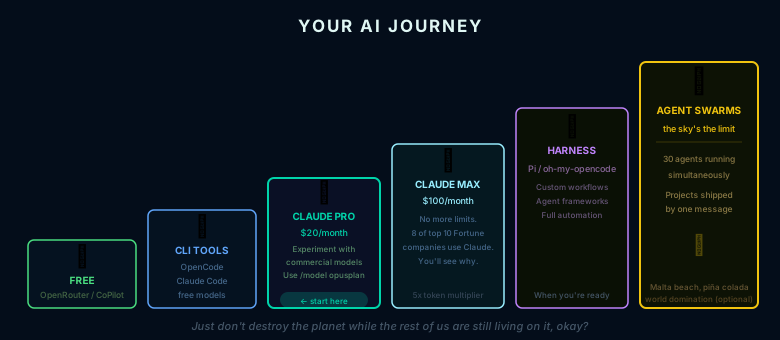
If you're just starting out, download OpenCode at https://opencode.ai/ , get yourself a free OpenRouter API key at https://openrouter.ai/ , set your model to the top free model at https://openrouter.ai/collections/free-models , and start playing around with what you can do. People with Github CoPilot can also use the CoPilot command line tool at https://docs.github.com/en/copilot/how-tos/copilot-cli/set-up-copilot-cli/install-copilot-cli to do the same thing. Although both Claude and OpenAI Codex have free plans, they are limited to the point where you can't really do anything useful before you run out of tokens. Meanwhile, you can spam OpenRouter free or CoPilot GPT 5.1-mini calls as much as you want without worrying about costs or limits.
-
When you're comfortable enough, pay $20 a month for a Claude Pro (https://claude.com/pricing) or OpenAI Codex Plus (https://developers.openai.com/codex/pricing) subscription. This will let you experiment around with the commercial offerings and understand the vast differences between the open source and commercial models. Just be sure to set
/model opusplanto use your tokens wisely so that Claude will automatically use Opus for planning and switch back to the lighter Sonnet model for implementation. -
Once you've reached the limit of the pro plan, pay $100 a month for the Claude Max (5x) subscription. There's a reason why eight out of the top Fortune 10 companies are using Claude, and you will quickly figure out why: https://www.adwaitx.com/claude-marketplace-enterprise/
-
And then, when you get tired of Claude limits and have the experience and expertise to use AI without worrying about agents ruining your life, try out one of the harnesses like Pi or the meta harnesses like oh-my-opencode.
-
After that, the sky's the limit… just don't destroy the planet while the rest of us are still living on it, okay?
Okay?
Okay???
Coda
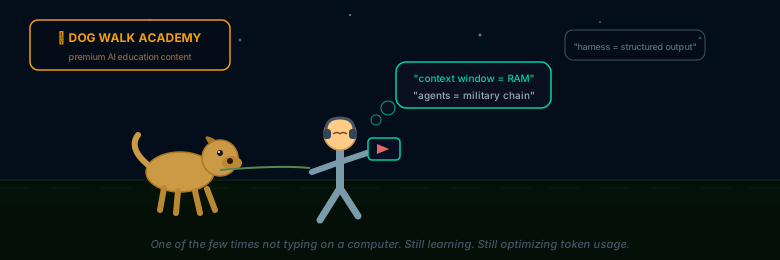
Some nice YouTube videos to watch when you're walking the dog… which incidentally is where most of my information comes from nowadays since that is one of the few times where I'm not typing on my computer:
-
A hilarious video about using Claude and Codex to build the same app with very different results. The quotes from this one could be used for many AI self-help seminars: https://www.youtube.com/watch?v=_GAc6SFoQ9k
-
How to use your token limit effectively so you're not running up 10k in charges every month: https://www.youtube.com/watch?v=49V-5Ock8LU
-
How Claude Code's creator actually uses it for his own work: https://www.youtube.com/watch?v=KWrsLqnB6vA&t=495s